| TableView1 | TableView2 |
|---|
 |
 |
|
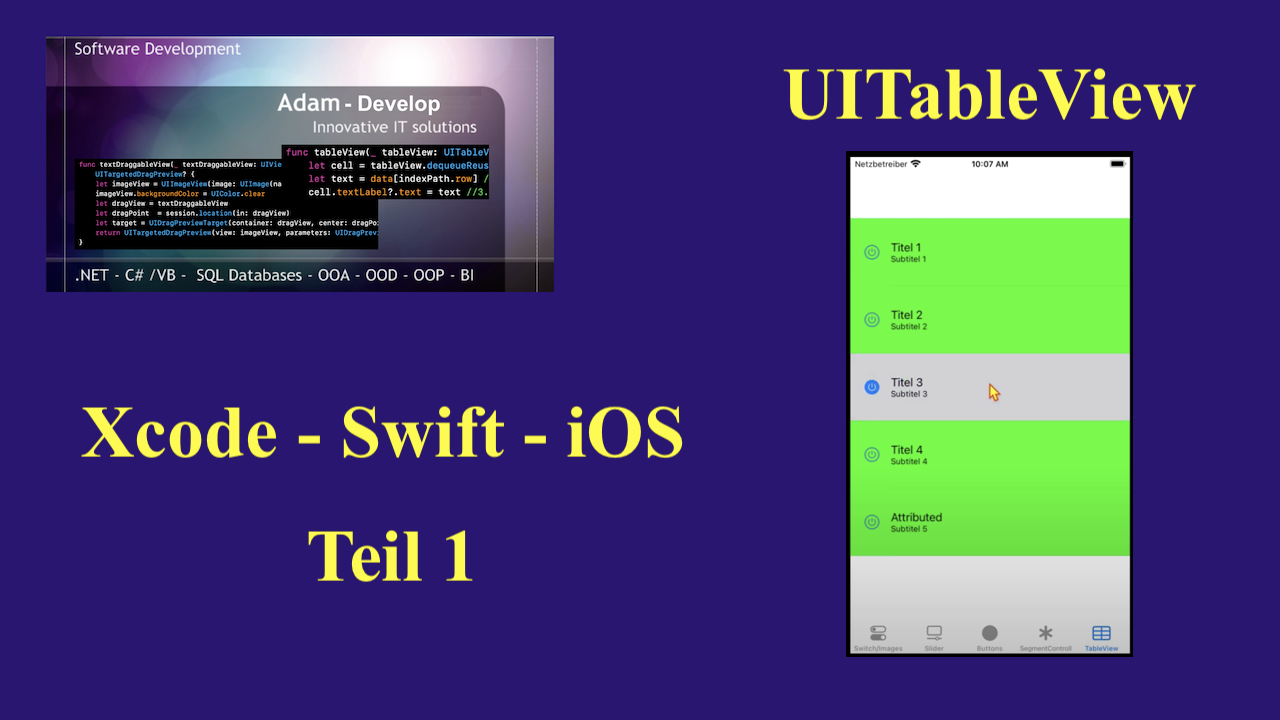
In diesem Video wird gezeigt wie man eine TableView mit Daten befüllt.
|
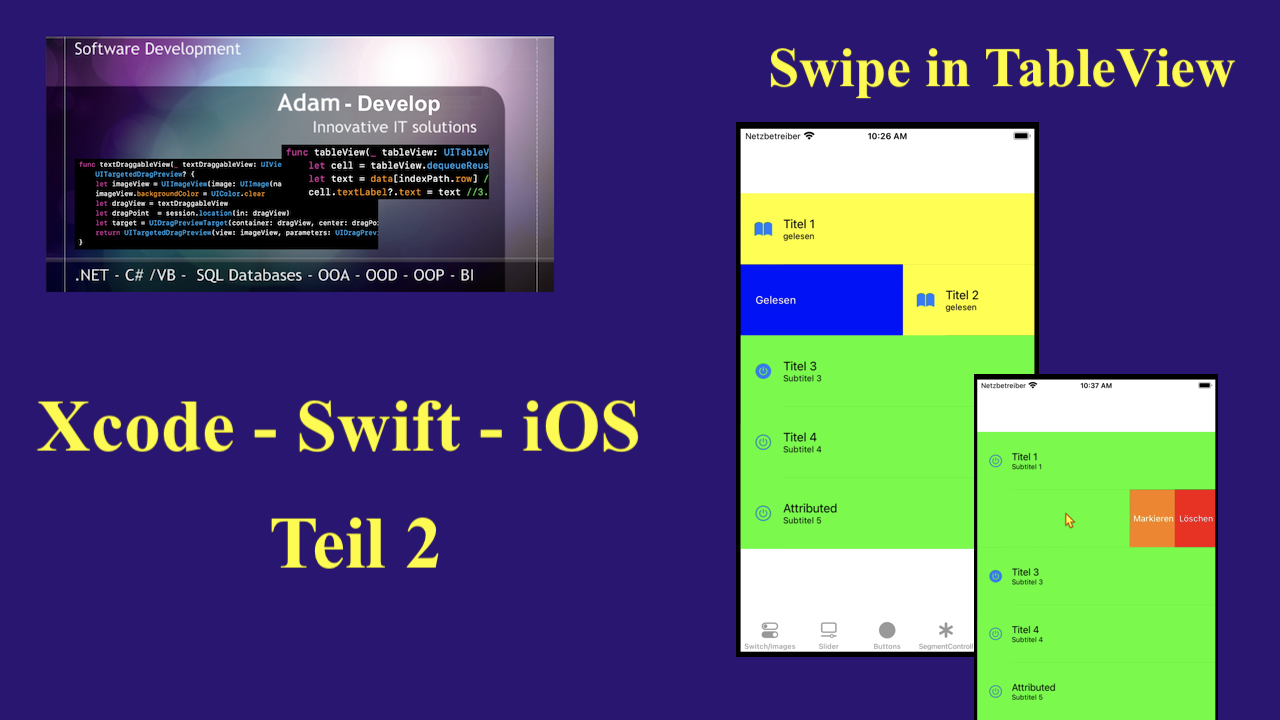
In diesem Video wird gezeigt wie man in die TableView 'Swipe-Funktionen' einbaut . |
| TableView3 | TableView4 |
|---|
 |
 |
|
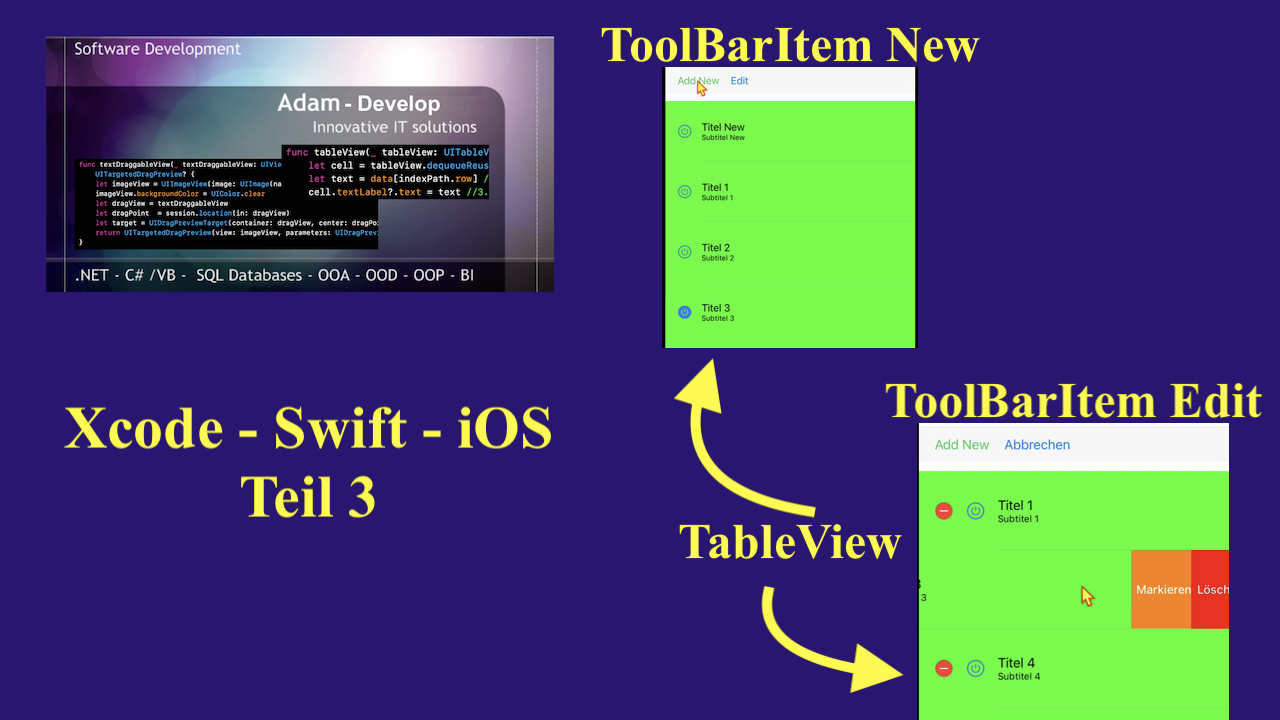
In diesem Video wird gezeigt wie neue Reihe(Row) mit ToolBarItem in die TableView eingefügt werden kann, sowie eine 'Edit-Funktion' ebenfalls mit ToolBarItem man aktiviert .
|
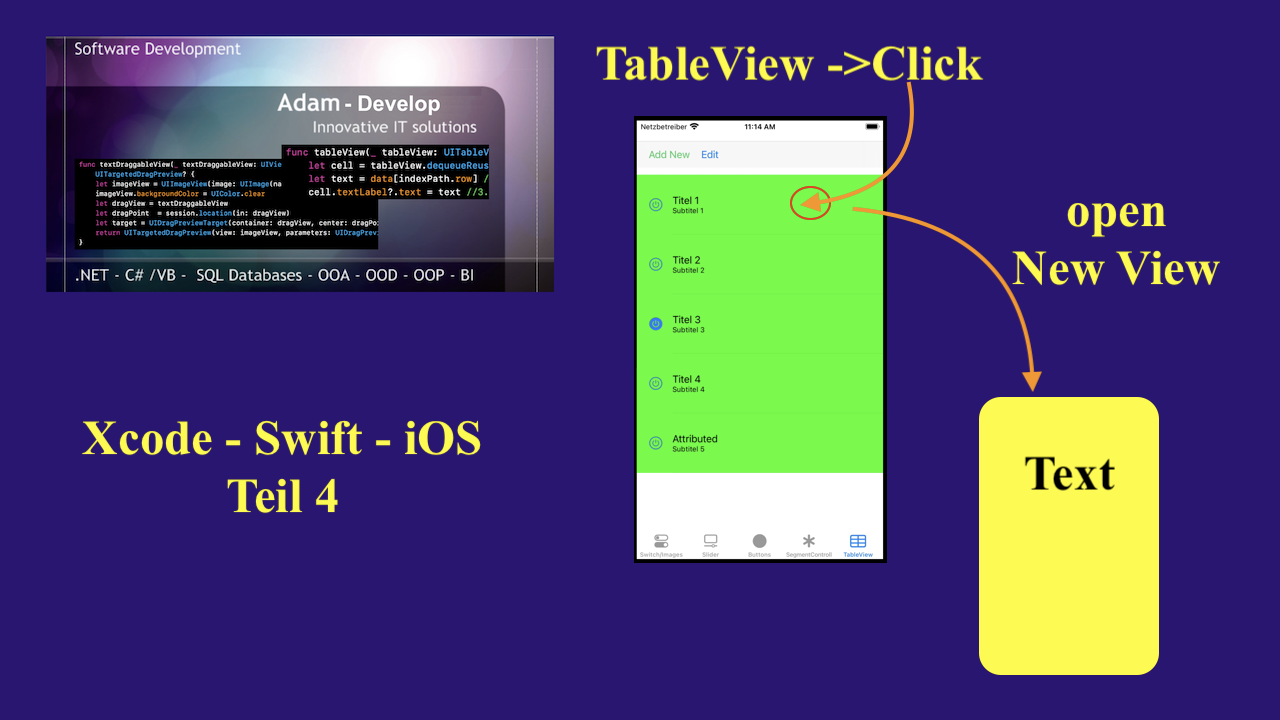
In diesem Video wird gezeigt wie man beim 'Click' auf die Zeile der TableView eine andere View einblendet und den Text übergibt . |
********** Code************
import UIKit
classTableViewController: UIViewController {
var tableData = [
(titel: "Titel 1", subtitle: "Subtitel 1"),
(titel: "Titel 2", subtitle: "Subtitel 2"),
(titel: "Titel 3", subtitle: "Subtitel 3"),
(titel: "Titel 4", subtitle: "Subtitel 4"),
(titel: "Titel 5", subtitle: "Subtitel 5")
]
@IBOutletweakvarMyTableView: UITableView!
@IBOutletweakvartoolBarItemEdit: UIBarButtonItem!
overridefuncviewDidLoad() {
super.viewDidLoad()
self.MyTableView.delegate = self
self.MyTableView.dataSource = self
}
}
extensionTableViewController: UITableViewDataSource{
func tableView(_ tableView: UITableView, numberOfRowsInSection section: Int) -> Int {
return self.tableData.count
}
func tableView(_ tableView: UITableView, cellForRowAt indexPath: IndexPath) -> UITableViewCell {
let cell = tableView.dequeueReusableCell(withIdentifier: "CellId", for: indexPath)
var content = cell.defaultContentConfiguration()
var factor = 0.0
var MyImage = UIImage()
if tableData[indexPath.row].titel == "Titel 1" {
MyImage = UIImage(named: "kreis")!
factor = MyImage.size.height / MyImage.size.width
}else if tableData[indexPath.row].titel == "Titel 2" {
MyImage = UIImage(named: "quadrat")!
factor = MyImage.size.height / MyImage.size.width
}else if tableData[indexPath.row].titel == "Titel 3" {
MyImage = UIImage(named: "rechteck")!
factor = MyImage.size.height / MyImage.size.width
}else {
MyImage = UIImage(named: "trapez")!
factor = MyImage.size.height / MyImage.size.width
}
content.image = getScaledImage(image: MyImage, scaledToSize: CGSize(width: 50, height: 50 * factor))
content.attributedText = makeAtributedString(title: tableData[indexPath.row].titel, subtitel: tableData[indexPath.row].subtitle, subtitel2: "sub2")
cell.contentConfiguration = content
cell.backgroundColor = .green
tableView.rowHeight = 70.0
return cell
}
funcmakeAtributedString(title: String, subtitel: String, subtitel2: String) -> NSAttributedString {
let titleAttr = [NSAttributedString.Key.font: UIFont.preferredFont(forTextStyle: .headline), NSAttributedString.Key.foregroundColor: UIColor.brown]
let titleString = NSMutableAttributedString(string: title, attributes: titleAttr)
let subtitleAttr = [NSAttributedString.Key.font: UIFont.preferredFont(forTextStyle: .subheadline), NSAttributedString.Key.foregroundColor: UIColor.blue]
let subtitleString = NSMutableAttributedString(string: "\n" + subtitel, attributes: subtitleAttr)
titleString.append(subtitleString)
let subtitleAttr2 = [NSAttributedString.Key.font: UIFont.preferredFont(forTextStyle: .subheadline), NSAttributedString.Key.foregroundColor: UIColor.gray, NSAttributedString.Key.backgroundColor: UIColor.white]
let subtitleString2 = NSMutableAttributedString(string: "\n" + subtitel2, attributes: subtitleAttr2)
titleString.append(subtitleString2)
return titleString
}
funcgetScaledImage(image: UIImage, scaledToSize newSize: CGSize) -> UIImage {
UIGraphicsBeginImageContext(newSize)
image.draw(in: CGRect(x: 0, y: 0, width: newSize.width, height: newSize.height))
let newImage = UIGraphicsGetImageFromCurrentImageContext()
UIGraphicsEndImageContext()
return newImage!.withRenderingMode(.alwaysOriginal)
}
}
extensionTableViewController: UITableViewDelegate{
privatefunchandleRead(indexPath: IndexPath, tableView: UITableView){
let cell = tableView.cellForRow(at: indexPath)
var content = cell?.defaultContentConfiguration()
content?.image = UIImage(systemName: "book.fill")
content?.text = tableData[indexPath.row].titel
content?.secondaryText = "gelesen"
cell?.contentConfiguration = content
cell?.backgroundColor = .yellow
}
privatefunchandleDelete(indexPath: IndexPath, tableView: UITableView){
tableData.remove(at: indexPath.row)
tableView.deleteRows(at: [indexPath], with: .fade)
}
privatefunchandleMark(indexPath: IndexPath, tableView: UITableView){
let cell = tableView.cellForRow(at: indexPath)
var content = cell?.defaultContentConfiguration()
content?.image = UIImage(systemName: "bookmark.fill")
content?.text = tableData[indexPath.row].titel
content?.secondaryText = "markiert"
cell?.contentConfiguration = content
cell?.backgroundColor = .magenta
}
functableView(_ tableView: UITableView, leadingSwipeActionsConfigurationForRowAt indexPath: IndexPath) -> UISwipeActionsConfiguration? {
let read = UIContextualAction(style: .normal, title: "Gelesen"){ [weak self] (action, view, completionHandler) in
self?.handleRead(indexPath: indexPath, tableView: tableView)
completionHandler(true)
}
read.backgroundColor = .blue
returnUISwipeActionsConfiguration(actions: [read])
}
functableView(_ tableView: UITableView, trailingSwipeActionsConfigurationForRowAt indexPath: IndexPath) -> UISwipeActionsConfiguration? {
let delete = UIContextualAction(style: .normal, title: "Löschen"){ [weak self] (action, view, completionHandler) in
self?.handleDelete(indexPath: indexPath, tableView: tableView)
completionHandler(true)
}
delete.backgroundColor = .red
let mark = UIContextualAction(style: .normal, title: "Markieren"){ [weak self] (action, view, completionHandler) in
self?.handleMark(indexPath: indexPath, tableView: tableView)
completionHandler(true)
}
mark.backgroundColor = .orange
let config = UISwipeActionsConfiguration(actions: [delete, mark])
config.performsFirstActionWithFullSwipe = true
return config
}
func tableView(_ tableView: UITableView, didSelectRowAt indexPath: IndexPath) {
self.performSegue(withIdentifier: "showView", sender: self)
}
override func prepare(for segue: UIStoryboardSegue, sender: Any?) {
if (segue.identifier == "showView") {
let upcoming : NewViewController = segue.destination as! NewViewController
let indexPath = self.MyTableView.indexPathForSelectedRow!
upcoming.titleTextViaSegue = tableData[indexPath.row].titel
upcoming.subTitleTextViaSegue = tableData[indexPath.row].subtitle
self.MyTableView.deselectRow(at: indexPath, animated: true)
}
}
}
extensionTableViewController{
@IBAction func addRow(_ sender: Any) {
let newData = [(titel: "Titel New", subtitle: "Subtitel New")]
self.tableData.insert(contentsOf: newData, at: 0)
MyTableView.beginUpdates()
MyTableView.insertRows(at: [IndexPath(row: 0, section: 0)], with: .right)
MyTableView.endUpdates()
}
@IBAction func editRows(_ sender: Any) {
if self.MyTableView.isEditing {
self.toolBarItemEdit.title = "Edit"
self.MyTableView.setEditing(false, animated: true)
} else {
self.toolBarItemEdit.title = "Abbrechen"
self.MyTableView.setEditing(true, animated: true)
}
}
}
Fenster schließen
| TableView1 | TableView2 |
|---|
|
|
|
In diesem Video wird gezeigt wie man eine TableView mit Daten befüllt.
|
In diesem Video wird gezeigt wie man in die TableView 'Swipe-Funktionen' einbaut . |
| TableView3 | TableView4 |
|---|
|
|
|
In diesem Video wird gezeigt wie neue Reihe(Row) mit ToolBarItem in die TableView eingefügt werden kann, sowie eine 'Edit-Funktion' ebenfalls mit ToolBarItem man aktiviert .
|
In diesem Video wird gezeigt wie man beim 'Click' auf die Zeile der TableView eine andere View einblendet und den Text übergibt . |
********** Code************
import UIKit
classTableViewController: UIViewController {
var tableData = [
(titel: "Titel 1", subtitle: "Subtitel 1"),
(titel: "Titel 2", subtitle: "Subtitel 2"),
(titel: "Titel 3", subtitle: "Subtitel 3"),
(titel: "Titel 4", subtitle: "Subtitel 4"),
(titel: "Titel 5", subtitle: "Subtitel 5")
]
@IBOutletweakvarMyTableView: UITableView!
@IBOutletweakvartoolBarItemEdit: UIBarButtonItem!
overridefuncviewDidLoad() {
super.viewDidLoad()
self.MyTableView.delegate = self
self.MyTableView.dataSource = self
}
}
extensionTableViewController: UITableViewDataSource{
func tableView(_ tableView: UITableView, numberOfRowsInSection section: Int) -> Int {
return self.tableData.count
}
func tableView(_ tableView: UITableView, cellForRowAt indexPath: IndexPath) -> UITableViewCell {
let cell = tableView.dequeueReusableCell(withIdentifier: "CellId", for: indexPath)
var content = cell.defaultContentConfiguration()
var factor = 0.0
var MyImage = UIImage()
if tableData[indexPath.row].titel == "Titel 1" {
MyImage = UIImage(named: "kreis")!
factor = MyImage.size.height / MyImage.size.width
}else if tableData[indexPath.row].titel == "Titel 2" {
MyImage = UIImage(named: "quadrat")!
factor = MyImage.size.height / MyImage.size.width
}else if tableData[indexPath.row].titel == "Titel 3" {
MyImage = UIImage(named: "rechteck")!
factor = MyImage.size.height / MyImage.size.width
}else {
MyImage = UIImage(named: "trapez")!
factor = MyImage.size.height / MyImage.size.width
}
content.image = getScaledImage(image: MyImage, scaledToSize: CGSize(width: 50, height: 50 * factor))
content.attributedText = makeAtributedString(title: tableData[indexPath.row].titel, subtitel: tableData[indexPath.row].subtitle, subtitel2: "sub2")
cell.contentConfiguration = content
cell.backgroundColor = .green
tableView.rowHeight = 70.0
return cell
}
funcmakeAtributedString(title: String, subtitel: String, subtitel2: String) -> NSAttributedString {
let titleAttr = [NSAttributedString.Key.font: UIFont.preferredFont(forTextStyle: .headline), NSAttributedString.Key.foregroundColor: UIColor.brown]
let titleString = NSMutableAttributedString(string: title, attributes: titleAttr)
let subtitleAttr = [NSAttributedString.Key.font: UIFont.preferredFont(forTextStyle: .subheadline), NSAttributedString.Key.foregroundColor: UIColor.blue]
let subtitleString = NSMutableAttributedString(string: "\n" + subtitel, attributes: subtitleAttr)
titleString.append(subtitleString)
let subtitleAttr2 = [NSAttributedString.Key.font: UIFont.preferredFont(forTextStyle: .subheadline), NSAttributedString.Key.foregroundColor: UIColor.gray, NSAttributedString.Key.backgroundColor: UIColor.white]
let subtitleString2 = NSMutableAttributedString(string: "\n" + subtitel2, attributes: subtitleAttr2)
titleString.append(subtitleString2)
return titleString
}
funcgetScaledImage(image: UIImage, scaledToSize newSize: CGSize) -> UIImage {
UIGraphicsBeginImageContext(newSize)
image.draw(in: CGRect(x: 0, y: 0, width: newSize.width, height: newSize.height))
let newImage = UIGraphicsGetImageFromCurrentImageContext()
UIGraphicsEndImageContext()
return newImage!.withRenderingMode(.alwaysOriginal)
}
}
extensionTableViewController: UITableViewDelegate{
privatefunchandleRead(indexPath: IndexPath, tableView: UITableView){
let cell = tableView.cellForRow(at: indexPath)
var content = cell?.defaultContentConfiguration()
content?.image = UIImage(systemName: "book.fill")
content?.text = tableData[indexPath.row].titel
content?.secondaryText = "gelesen"
cell?.contentConfiguration = content
cell?.backgroundColor = .yellow
}
privatefunchandleDelete(indexPath: IndexPath, tableView: UITableView){
tableData.remove(at: indexPath.row)
tableView.deleteRows(at: [indexPath], with: .fade)
}
privatefunchandleMark(indexPath: IndexPath, tableView: UITableView){
let cell = tableView.cellForRow(at: indexPath)
var content = cell?.defaultContentConfiguration()
content?.image = UIImage(systemName: "bookmark.fill")
content?.text = tableData[indexPath.row].titel
content?.secondaryText = "markiert"
cell?.contentConfiguration = content
cell?.backgroundColor = .magenta
}
functableView(_ tableView: UITableView, leadingSwipeActionsConfigurationForRowAt indexPath: IndexPath) -> UISwipeActionsConfiguration? {
let read = UIContextualAction(style: .normal, title: "Gelesen"){ [weak self] (action, view, completionHandler) in
self?.handleRead(indexPath: indexPath, tableView: tableView)
completionHandler(true)
}
read.backgroundColor = .blue
returnUISwipeActionsConfiguration(actions: [read])
}
functableView(_ tableView: UITableView, trailingSwipeActionsConfigurationForRowAt indexPath: IndexPath) -> UISwipeActionsConfiguration? {
let delete = UIContextualAction(style: .normal, title: "Löschen"){ [weak self] (action, view, completionHandler) in
self?.handleDelete(indexPath: indexPath, tableView: tableView)
completionHandler(true)
}
delete.backgroundColor = .red
let mark = UIContextualAction(style: .normal, title: "Markieren"){ [weak self] (action, view, completionHandler) in
self?.handleMark(indexPath: indexPath, tableView: tableView)
completionHandler(true)
}
mark.backgroundColor = .orange
let config = UISwipeActionsConfiguration(actions: [delete, mark])
config.performsFirstActionWithFullSwipe = true
return config
}
func tableView(_ tableView: UITableView, didSelectRowAt indexPath: IndexPath) {
self.performSegue(withIdentifier: "showView", sender: self)
}
override func prepare(for segue: UIStoryboardSegue, sender: Any?) {
if (segue.identifier == "showView") {
let upcoming : NewViewController = segue.destination as! NewViewController
let indexPath = self.MyTableView.indexPathForSelectedRow!
upcoming.titleTextViaSegue = tableData[indexPath.row].titel
upcoming.subTitleTextViaSegue = tableData[indexPath.row].subtitle
self.MyTableView.deselectRow(at: indexPath, animated: true)
}
}
}
extensionTableViewController{
@IBAction func addRow(_ sender: Any) {
let newData = [(titel: "Titel New", subtitle: "Subtitel New")]
self.tableData.insert(contentsOf: newData, at: 0)
MyTableView.beginUpdates()
MyTableView.insertRows(at: [IndexPath(row: 0, section: 0)], with: .right)
MyTableView.endUpdates()
}
@IBAction func editRows(_ sender: Any) {
if self.MyTableView.isEditing {
self.toolBarItemEdit.title = "Edit"
self.MyTableView.setEditing(false, animated: true)
} else {
self.toolBarItemEdit.title = "Abbrechen"
self.MyTableView.setEditing(true, animated: true)
}
}
}


